Countdowns
Days until the things you look forward to (or dread): holidays, launches, deadlines, birthdays
 von @PleasePrompto
Screenshots
README
Countdowns
Days until the things you look forward to (or dread): holidays, launches, deadlines, birthdays. Everything stays on your computer; no accounts, no API keys.
What you see
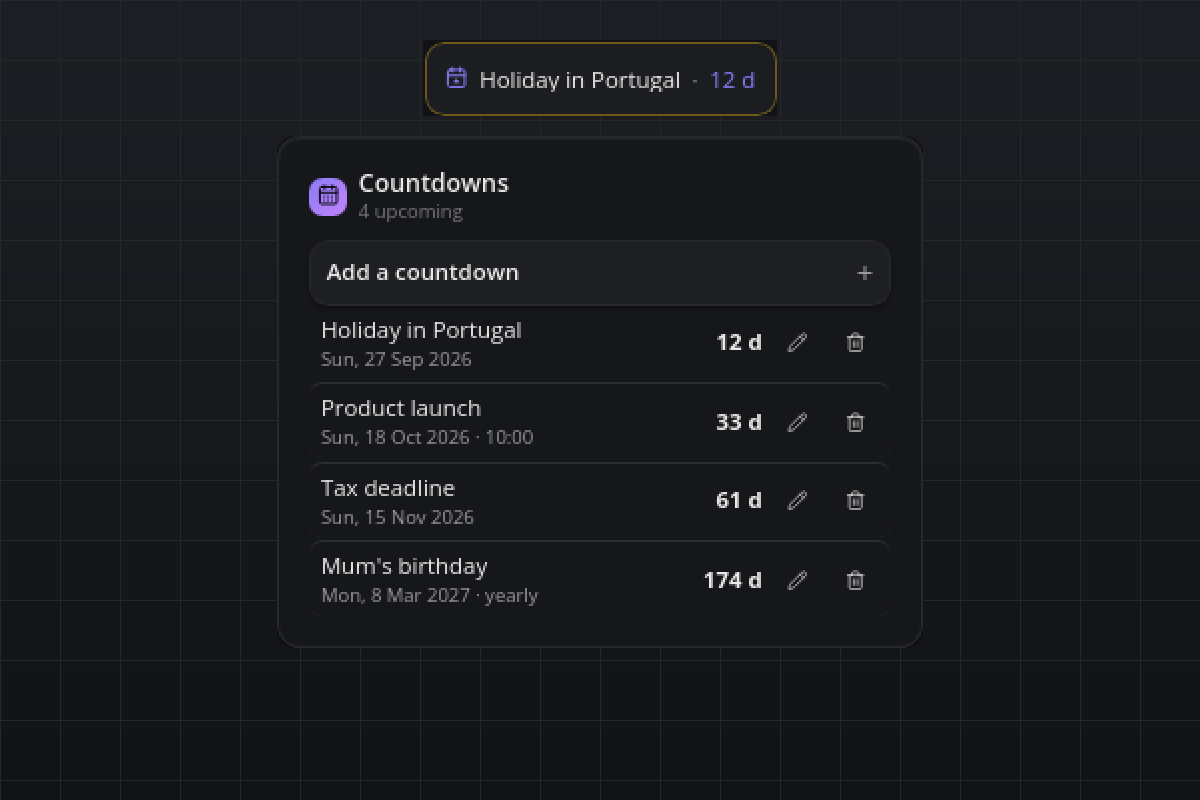
- Tile: the next event and its day count, "Holiday in Portugal · 12 d". On the day it says "today!". When the event has a time and is less than a day away, the tile counts down live in hours and minutes.
- Flyout: a collapsible form to add a countdown (title, date, optional time, yearly switch) and the list sorted by date: title, date line, the bold day count on the right. Under 7 days the count takes the warning color, on the day the accent color. Passed one-time events stay muted for a few days, then disappear. Every row has an edit dialog and a delete button; the flyout lists
maxItemsrows and shows the rest as "+N more". - Hover: the next three events, one line each.
- Popup: on the morning of an event, "Today: <title>" with a Dismiss button. Once per event and day.
Requirements
- smabar with Python plugins (the bundled uv runs it on Python 3.12+). Linux, macOS and Windows.
How it works
- Events live in
~/.smabar/data/countdowns/events.json, written atomically. - Days left are calendar days: the event's date minus today's local date. Clock changes (DST) never shift the count.
- Yearly events roll forward to the next anniversary once passed. A Feb 29 event falls on Feb 28 in a common year.
- Once a minute the plugin checks whether the date changed or a timed event entered its last day, and re-renders only then. The ticking hours and minutes come from the bar itself.
- The popup fires on the first check on the event's date. That date is stored with the event (
notifiedFor), so a restart does not repeat it. While popups are muted (do-not-disturb) it tries again a minute later.
Agent commands
add (title, date YYYY-MM-DD, optional time HH:MM, optional repeatYearly), list (every visible countdown with its days left and status) and remove (id). Discover them with plugin_commands("countdowns").
Settings
| Setting | Default | Meaning |
|---|---|---|
keepPastDays |
3 |
Days a passed one-time countdown stays in the list before it disappears (0 to 365). |
maxItems |
8 |
Rows the flyout lists; the rest is shown as "+N more" (1 to 50). |
notify |
true |
Show the popup on the morning of an event. |
Privacy
Everything stays local. The plugin never contacts a server and reads nothing but its own data file.
Known limits
- The live hours-and-minutes countdown is zero-padded ("in 03 h 20 min"); that is the bar's countdown format.
- Passed one-time events are removed from the file once they are older than
keepPastDays; raising the setting later does not bring them back. - Dates are calendar days in your local time zone; there is no per-event time zone.
Development
python3 test_countdowns.py runs the day-math and markup self-check without a running bar.
#countdown #events #calendar #deadline #birthday #holiday #reminder
gelistet von main bei d4b430c83abc, aktualisiert vor 3 Tagen
verwandt