
Docker
Your containers on the bar: what runs, what stopped, ports, and start/stop without a terminal — Docker Desktop, Docker Engine and Podman
 von @PleasePrompto
Screenshots
README
Docker
Your containers on the bar: what runs, what stopped, which ports are published, and start, stop or restart without opening a terminal. Works with Docker Desktop, Docker Engine and Podman. No API keys, and nothing leaves your computer.
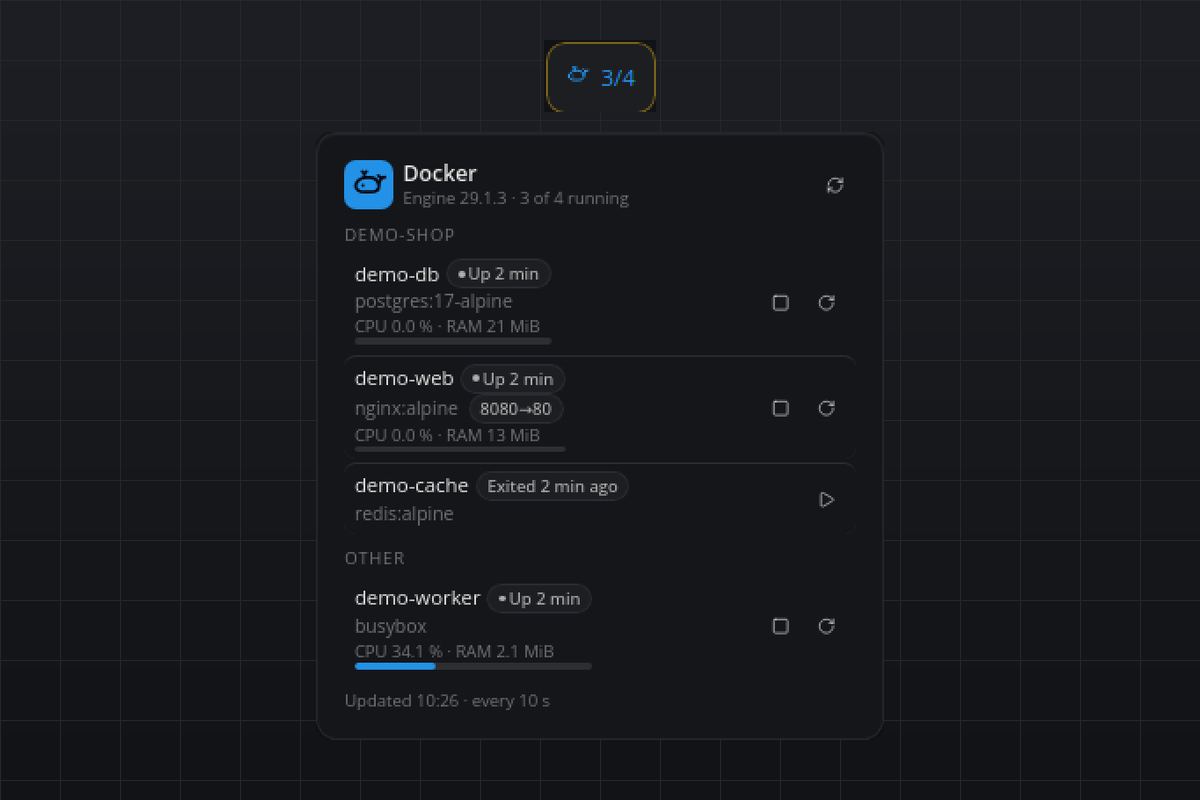
What you see
- Tile: the whale and
3/5(running of total) in the accent color while something runs, muted when nothing runs.No containerswhen the engine is empty,Docker offlinein red when the daemon cannot be reached,Not foundwhen the binary does not exist. - Flyout: a heading with the engine name, its version and the running count, plus a refresh button. One section per Compose project (
Otherfor standalone containers). Every row shows the name, a state badge (Up 4 hgreen,Exited (137) 3 min agored,Pausedyellow), the image, the published ports as chips (8080→80), and for running containers a CPU/RAM line with a slim CPU bar when stats are on. Icon buttons fit the state: stop and restart for running containers, start for stopped ones; while an action runs the row shows a spinner. When the engine goes away, the last known list stays visible muted with its buttons disabled, under a red alert with the engine's message. - Hover: one line such as
3 running · web, cache, db. - Popup: only when a start, stop or restart fails: what failed and the engine's first error line, for eight seconds.
Requirements
- Docker Desktop, Docker Engine (the
dockerCLI with access to the daemon) or Podman (podman), onPATHor as a full path in the settings. - Linux, macOS or Windows.
How it works
- Every refresh runs
<binary> ps -a --format '{{json .}}'on a worker thread. When stats are on and something runs,<binary> stats --no-streamfollows; Docker needs one to two seconds for it, so the list renders first and the numbers a moment later. Thecom.docker.compose.projectlabel groups the rows. - The buttons run
<binary> start|stop|restart <id>on their own thread with a 30 s timeout; the list refreshes as soon as the command returns. - Every start, stop and restart, whether from a button or from an agent command, is written to the plugin log with the container, its name, the source (
flyoutorcommand) and the outcome, so a change made through this plugin is always traceable. - Podman prints a different JSON shape (names as a list, ports as mappings, labels as a map, unix timestamps instead of an
Up 4 hourstext); both shapes are normalised into the same rows. The Podman path is built from Podman's source and covered by fixtures in the test, but it has not been exercised against a live Podman installation. - A missing binary and an unreachable daemon are logged once (not on every refresh) and shown as an alert in the flyout; the last good list stays on screen until the engine answers again.
Settings
| Setting | Default | Meaning |
|---|---|---|
binary |
docker |
The container CLI: docker, podman, or a full path to one of them. |
refreshSeconds |
10 |
Seconds between refreshes of the container list. The minimum is 3. |
showStats |
true |
Read CPU and memory of running containers on every refresh. Off saves the one to two second stats call. |
Agent commands
listreturns the containers as last read: state, age of that state, exit code, health, ports, Compose project and, with stats on, CPU and memory.start,stopandrestarttake{"container": "<name or id>"}, run the engine command and wait for its answer (up to 30 s).plugin_callitself waits 10 s: a container that ignores SIGTERM makesstopandrestarttake Docker's full 10 s grace period, so the call can report a timeout although the command completes. Calllistto see the result.
Privacy
Everything stays local. The plugin runs the container CLI and reads its output. It never contacts a server and never reads the images, volumes or environment variables of your containers.
Known limits
- Removing containers, images or volumes is out of scope; use the CLI or your desktop app.
- Paused containers offer stop and restart. Docker's
startrefuses a paused container andunpauseis not exposed. - Exposed-only ports without a host binding (for example
3306/tcp) are not shown as chips. - Podman support has not been tested against a live installation (see above).
Development
python3 test_engine.py runs the parser, port formatting, grouping and markup self-check without a running bar.
#docker #podman #containers #compose #devops #developer #local
gelistet von main bei d4b430c83abc, aktualisiert vor 3 Tagen