
Keep Awake
One switch that keeps the screen on and the computer from sleeping — for a presentation, a long download or a build
 von @PleasePrompto
Screenshots
README
Keep Awake
One switch that keeps the screen on and the computer from sleeping, for a presentation, a long download or a build. No API keys, nothing leaves your computer.
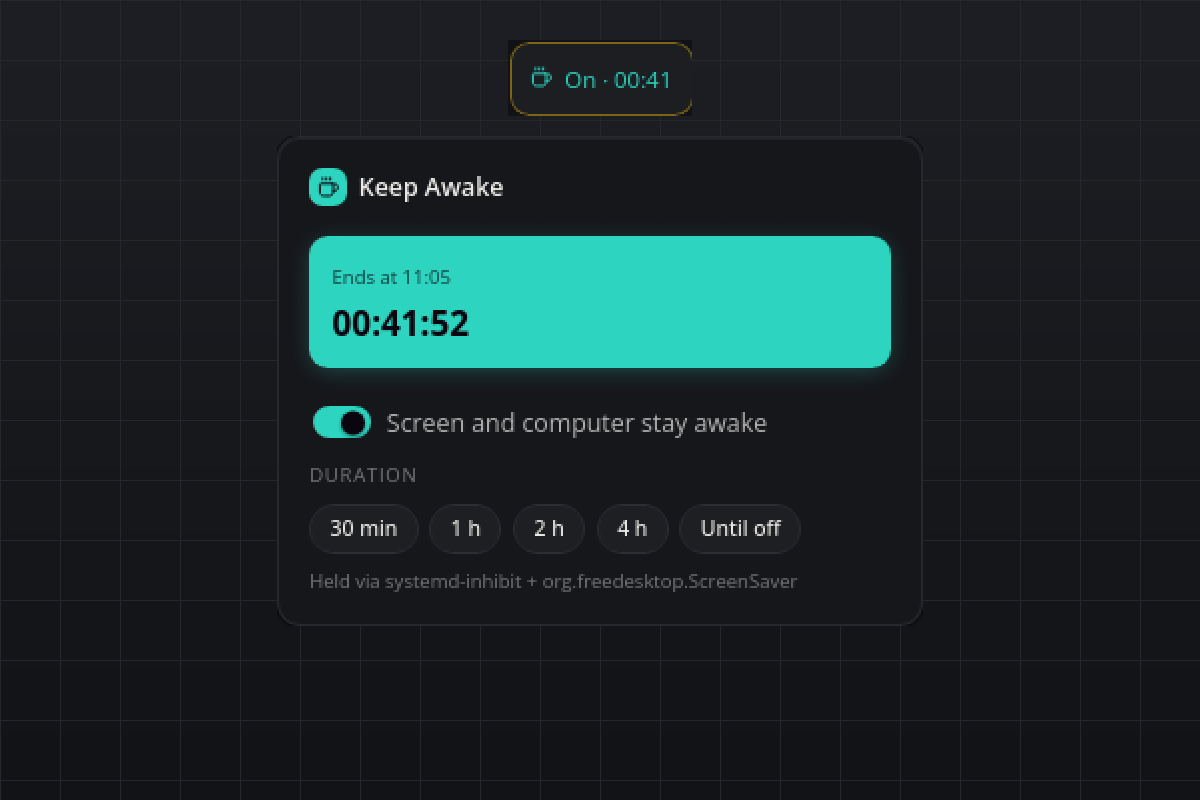
What you see
- Tile: a coffee cup with "Off" while nothing is held, "On" in the accent colour while it is. A timed session shows the remaining time as
hh:mm, ticking down without a single re-render. - Flyout: the switch, five duration chips (30 min, 1 h, 2 h, 4 h, Until off), while on a hero with the end time and a live countdown, and a muted line naming the mechanism that holds the inhibit. The chips work while off (start for that long) and while on (change the duration).
- Hover: "Keep Awake · on for 42 more min" or "Keep Awake · off".
- Popup: "Keep Awake ended" when a timed session runs out.
The plugin always starts off. Nothing is remembered across a restart of smabar or the plugin, so a forgotten session can never keep a machine awake for days.
Requirements
- Linux:
systemd-inhibitfor sleep, plus one of these for screen idle:gnome-session-inhibit, the distropython3with PyGObject (talks toorg.freedesktop.ScreenSaver; GNOME, Cinnamon and MATE ship it), orxdg-screensaveron X11. Whatever exists is used, and the flyout shows which. - macOS:
caffeinate, part of the system. - Windows: nothing extra; the plugin calls
SetThreadExecutionState.
How it works
| Platform | Mechanism |
|---|---|
| Linux | systemd-inhibit --what=idle:sleep --mode=block as a child process, plus the first screen-idle inhibitor that comes up: gnome-session-inhibit --inhibit idle, then inhibit_linux.py (a tiny helper that registers an org.freedesktop.ScreenSaver inhibit and holds the D-Bus connection open), then xdg-screensaver reset every 50 seconds. |
| macOS | caffeinate -dims -w <plugin pid>: display, idle, disk and system assertions. |
| Windows | SetThreadExecutionState(ES_CONTINUOUS | ES_SYSTEM_REQUIRED | ES_DISPLAY_REQUIRED) on a dedicated thread, cleared with ES_CONTINUOUS on stop. |
Every inhibitor is tied to the plugin's own process: the Linux children wait for the plugin's pid (tail --pid), caffeinate -w waits for it, the Windows state dies with its thread. Switching off, a plugin reload or a graceful stop releases everything at once, and even a hard kill leaves nothing behind.
Settings
| Setting | Default | Meaning |
|---|---|---|
defaultMinutes |
60 |
How long a session started with the switch or the on command lasts. 0 keeps the computer awake until you switch it off. |
Agent commands
| Command | Arguments | Result |
|---|---|---|
on |
minutes optional, 0 to 1440 |
Starts a session, or changes the duration of the running one. |
off |
none | Releases every inhibitor. |
status |
none | on, remainingMinutes, endsAt, mechanism, error. |
Privacy
Everything stays local. The plugin starts a system tool or a helper process and writes no files at all.
Known limits
- On Cinnamon
xdg-screensaver resetdoes nothing while the screensaver is inactive, which is why the D-Bus helper exists. Without PyGObject only sleep is inhibited there, not screen blanking; the flyout line showssystemd-inhibitalone in that case. - Lid close, the power button and a sleep you trigger yourself are never blocked.
- Windows:
SetThreadExecutionStatekeeps the display and the system awake but does not stop a classic screen saver. - macOS: the system-sleep assertion (
-s) applies on AC power only; on battery idle sleep is still prevented. - The Windows and macOS backends follow the official documentation; they were built and verified on Linux (X11, Cinnamon).
Development
python3 test_backend.py checks the platform selection, the timer bookkeeping and the markup without a running bar and without starting any inhibitor.
#keep-awake #caffeine #sleep #screensaver #presentation #inhibit #power
gelistet von main bei d4b430c83abc, aktualisiert vor 3 Tagen