
Quick Notes
A scratchpad on the bar: jot a note in two seconds and find it again later — plain Markdown files you can open in any editor
 von @PleasePrompto
Screenshots
README
Quick Notes
A scratchpad on the bar: jot something down in two seconds, find it again later. Every note is a plain Markdown file on your disk, so any editor or Obsidian can open the folder. No accounts, no API keys, nothing leaves your computer.
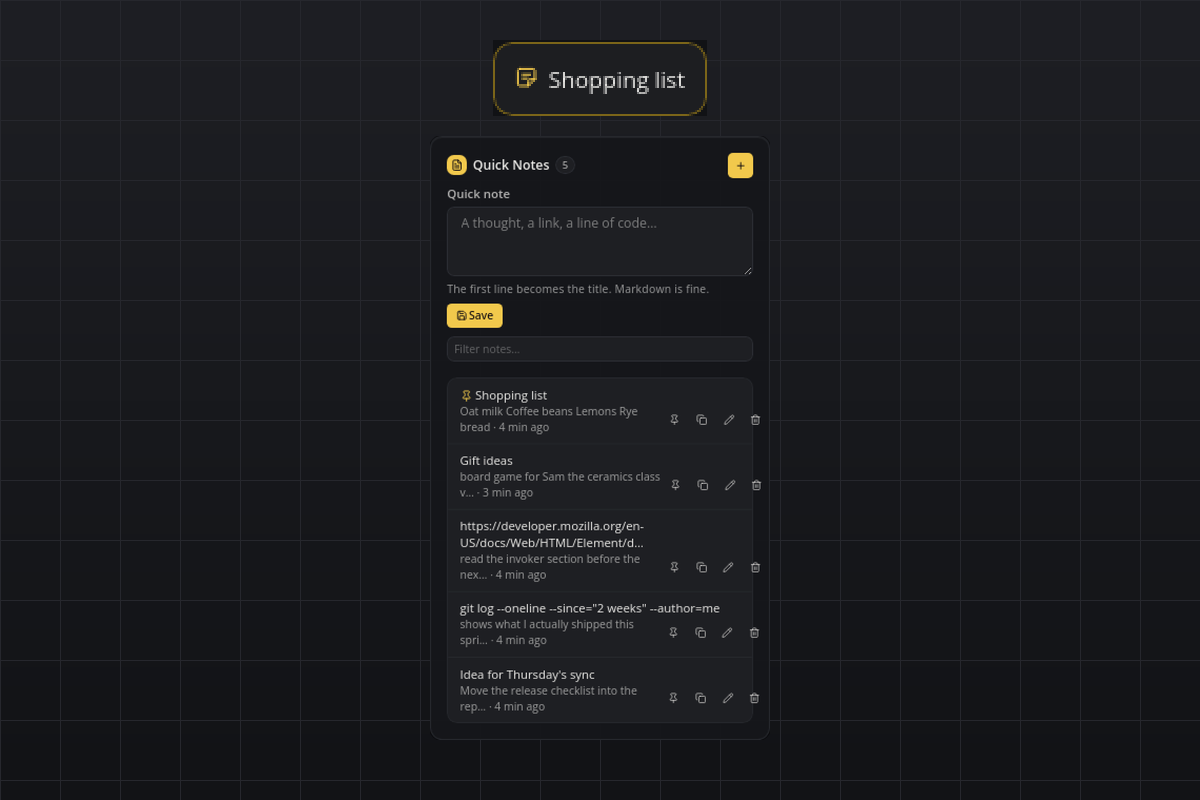
What you see
- Tile: one calm line with the sticky-note icon. By default it shows the title of the pinned note (or the latest one when nothing is pinned); the
tileModesetting switches it to always the latest note or to the number of notes. - Flyout: the heading row with the note count and a "+" button for a larger editor, a quick-note textarea with Save, a filter field, and the list of notes newest first (the pinned note on top). Every row shows the title, a preview of the body, how long ago it was updated, and four icon actions: pin/unpin, copy the full text, edit in a dialog, delete.
- Hover: the first three lines of the pinned (or latest) note.
- Popup: a short "Saved" toast after saving, and a "Deleted" toast with an Undo button that stays for ten seconds.
Requirements
- Nothing beyond smabar. Linux, macOS and Windows.
How it works
- Each note is one file:
<data dir>/notes/<YYYYMMDD-HHMMSS>-<random>.md. The first non-empty line is the title (Markdown headings and list markers are stripped for display); the file's modification time is the "updated" time. Files are written atomically, so an editor never sees a half-written note. - The data dir is smabar's data directory for the plugin,
~/.smabar/data/quick-notes/on Linux and macOS and%USERPROFILE%\.smabar\data\quick-notes\on Windows. Point Obsidian or any editor at itsnotesfolder. - The plugin rescans that folder every 30 seconds. Files you add, edit or remove elsewhere show up on the next scan; any
*.mdfile counts as a note, its file name is the id. - The pinned note is remembered in
pinned.jsonnext to thenotesfolder, so the Markdown files stay clean. - Undo after Delete restores the file from a copy the plugin keeps in memory until the next delete or undo.
Agent commands
Coding agents can use the plugin through smabar's MCP server (plugin_commands("quick-notes"), then plugin_call):
| Command | Arguments | Returns |
|---|---|---|
notes.add |
text |
id, title |
notes.list |
query (optional), limit (optional, default 50) |
notes[] with id, title, preview, updated, pinned |
notes.search |
query, limit (optional) |
same as notes.list |
notes.get |
id |
the summary plus the full text |
notes.delete |
id |
deletedId |
Adding and deleting through a command shows the same toasts as the flyout, so you can undo an agent's delete too.
Settings
| Setting | Default | Meaning |
|---|---|---|
tileMode |
pinned |
What the tile shows: pinned (the pinned note's title, or the latest one), latest (always the newest note's title), count (the number of notes). |
Privacy
Everything stays local. The plugin only reads and writes its own notes folder and pinned.json; it never contacts a server.
Known limits
- One note can be pinned at a time; pinning another note replaces the pin.
- The filter field matches the visible title and preview; the
notes.searchcommand searches the full text. - The "updated" ages in the list refresh when something changes, not every minute.
- A change to the notes folder from outside the bar re-renders the list, which closes an editor dialog that is open at that moment.
Development
python3 test_notes.py runs the store, markup and state-machine self-check without a running bar.
#notes #scratchpad #markdown #obsidian #memo #clipboard #productivity
gelistet von main bei d4b430c83abc, aktualisiert vor 3 Tagen