
Clipboard History
Everything you copied as text, found again in one click — local, searchable, pinnable

screenshots
README
Clipboard History
Everything you copied as text, found again in one click. The bar shows the latest entry, the flyout holds the searchable history with copy, pin and delete. Text only, local only, no API keys.
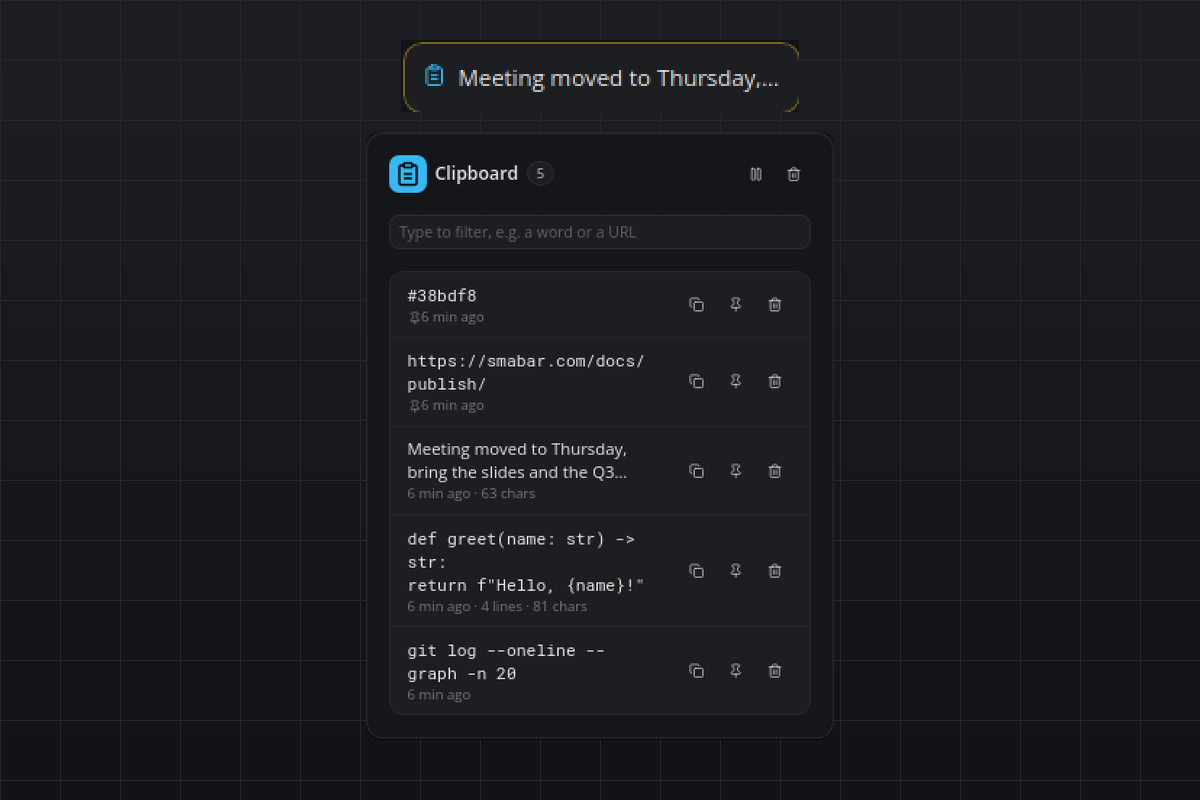
What you see
- Tile: the clipboard icon and the latest entry on one line (newlines collapsed, cut at about 28 characters),
Emptybefore the first copy,Pausedwith a muted pause icon while recording is off. - Flyout: the entry count, a filter box that narrows the list as you type, and two header actions: Pause/Resume and Clear history (asks first; pinned entries stay). Entries are listed pinned first, then newest first. Each row shows a two-line preview, in monospace when the text looks like code, a URL or a colour, the time of the last copy and, for long texts,
N lines · N chars. Three icon buttons per row: copy back to the clipboard, pin/unpin, delete. - Hover: the latest three entries, one line each.
- Popup: none. The plugin never interrupts.
Requirements
- Linux:
wl-clipboard(wl-paste,wl-copy) on Wayland,xcliporxselon X11 to read and write the text. Without one of them the tile showsInstall …and the flyout says which package is missing. Change notifications come from the X server (XFixes, also under XWayland) or fromwl-paste --watchon compositors with the data-control protocol (Sway, Hyprland, KDE);python-xlibis fetched automatically. - macOS: nothing to install;
pbpasteships with the system andpyobjc-framework-Cocoais fetched automatically for the change counter. - Windows: nothing, the clipboard is read through the Win32 API.
How it works
- The clipboard is read only when it changed. A watcher thread signals the change without reading anything: an XFixes event from the X server on X11 and XWayland,
wl-paste --watchon Wayland compositors with data-control,GetClipboardSequenceNumbercompared twice a second on Windows,NSPasteboard.changeCountcompared twice a second on macOS (Apple offers no notification). The read itself iswl-paste,xclip,xselorpbpasteas a short subprocess,GetClipboardDatathrough ctypes on Windows. There is no daemon and no PowerShell. - Without any watcher (GNOME on Wayland without XWayland, for example) the plugin falls back to reading the clipboard every
pollSeconds. The flyout's last line says which mode is active. - New text goes to the top of the history. Copying something that is already in the history moves it to the top instead of adding a duplicate. Whitespace-only text and texts longer than
maxCharsare ignored. - The history keeps
maxEntriesunpinned entries; the oldest unpinned entry falls off first. Pinned entries do not count and never fall off. - The copy button asks the plugin to write the clipboard itself (
wl-copy,xclip,xsel,pbcopyorSetClipboardDataon Windows) and shows a short toast. Copying an entry back moves it to the top; the flyout follows a few seconds later so the row does not jump away under the pointer. - Relative times in the flyout are refreshed once a minute.
Agents can drive the history over MCP with plugin_call: list (optional query, limit), get (full text), pin, delete, clear and pause.
Settings
| Setting | Default | Meaning |
|---|---|---|
pollSeconds |
1 |
Seconds between clipboard reads on a system without change notifications. 0.5 is the smallest value. |
maxChars |
20000 |
Texts longer than this many characters are not recorded. |
maxEntries |
100 |
How many unpinned entries are kept. Pinned entries do not count. |
paused |
false |
Stop recording. The flyout's pause button toggles the same setting, so a pause survives restarts. |
Privacy
- Everything stays on this computer. The plugin makes no network requests and starts no service; the only thing it reads is the clipboard.
- The history lives in the plugin's data directory, one JSON file you can inspect or delete at any time:
~/.smabar/data/clipboard-history/history.jsonon Linux and macOS,%USERPROFILE%\.smabar\data\clipboard-history\history.jsonon Windows. Removing the plugin removes the file. - Use Pause before copying passwords, tokens or anything else that must not be kept. Whatever sits in the clipboard when recording resumes (or when the plugin starts) is deliberately not recorded; only texts copied after that are.
- On Linux the plugin needs
wl-clipboard,xcliporxsel. It never installs anything itself. - Only text is recorded. Images, files and other clipboard formats are ignored.
Known limits
- On Windows and macOS the change counter is compared twice a second, so a text copied and replaced within half a second is missed. On X11 and Wayland every change is caught.
- GNOME on Wayland offers no clipboard change protocol to other programs; there the plugin works through XWayland (usual on Ubuntu and Fedora) and otherwise falls back to polling.
- The filter box searches the rows in the flyout; a history with very many very long entries renders only what fits into the bar's message limit (about 700 KB of rows) and says how many older entries are not shown.
- Windows and macOS capture and the Wayland watcher are implemented but were only exercised on Linux (X11 with
xseland XFixes). - Applications that put text on the clipboard in a non-text format only (some terminals, some password managers) are not captured. Password managers that clear the clipboard after a few seconds are captured unless you pause first.
Development
python3 test_history.py runs the store, markup and watcher self-check without a running bar. On an X11 desktop with xsel the watcher check copies one line through the real clipboard and restores what was there.
#clipboard #history #copy #paste #snippets #productivity #privacy
listed from main at d4b430c83abc, updated 3 days ago
related